iPhone 13 Pro Max White or Green Screen Issue
The iPhone 13 Pro Max has a high-quality OLED display, but like any phone, it can still develop screen faults after a drop, pressure damage, liquid exposure, failed repair attempt, or internal connection issue.
Some customers see a full white screen. Others see a green screen, green line, flashing display, or a screen that turns on but does not show the correct image. The phone may still ring, vibrate, charge, or connect to a computer, but the screen itself does not display properly.
From real repair experience, not every iPhone 13 Pro Max white or green screen issue is solved by replacing the display. Some phones need a deeper diagnosis to check the display line, connector area, board condition, and whether jumper repair is required.
What Is the iPhone 13 Pro Max White or Green Screen Problem?
The white or green screen issue usually means the iPhone is powering on, but the display is not showing the image correctly. The phone may still work in the background, but the screen output is faulty.
This can happen suddenly after a drop, after pressure on the screen, after liquid exposure, or sometimes after the phone has been opened or repaired before.
Common Symptoms
Full White Screen
The iPhone turns on, but the screen stays completely white or washed out.
Full Green Screen
The display turns green or shows a strong green tint across the screen.
Green Lines or Flickering
Vertical green lines, flashing, or unstable display output can appear after impact or internal display damage.
Phone Works but Screen Does Not
The iPhone may still ring, vibrate, charge, or receive calls, but the screen does not show a usable image.
Screen Replacement Did Not Fix It
If another screen has already been tested and the issue remains, the fault may be deeper than the display assembly.
Why Does the iPhone 13 Pro Max Screen Turn White or Green?
There is not always one simple reason. A white or green screen can be caused by display panel damage, connector damage, board-level display circuit issues, previous repair damage, or liquid-related faults.
That is why diagnosis is important. Replacing the screen without checking the phone properly can waste money if the real fault is not the display itself.
Drop or Pressure Damage
A drop can damage the OLED panel, display flex, connector area, or internal display path. Sometimes the glass looks fine, but the image output is still affected.
Display Connector Issue
If the connector is loose, damaged, dirty, or affected by previous repair work, the screen may not receive the correct signal.
Board-Level Display Fault
In some cases, the display signal path on the board may be damaged. This is where professional testing and micro-soldering may be required.
Liquid Exposure
Even small liquid exposure can affect display circuits, connectors, and internal components. The phone may still power on, but the screen output can fail.
Previous Repair Attempt
If the phone has been opened before, damaged flexes, missing components, lifted pads, or connector damage can create display problems.
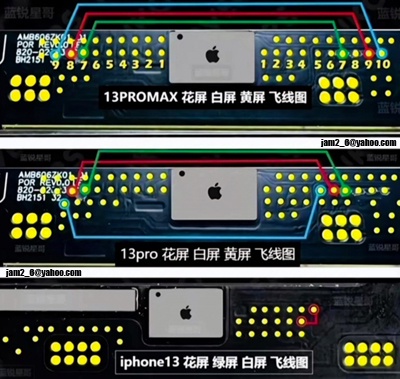
What Is the Soldering Jumper Method?
The soldering jumper method is a micro-soldering repair technique used when a circuit path is damaged or not making the correct connection. A technician uses a very fine wire to reconnect the affected points so the display signal can pass through again.
This is not the same as a normal screen replacement. It requires the right tools, microscope work, soldering skill, and careful testing. If too much heat is used or the wrong point is connected, the phone can be damaged further.
The jumper method should only be attempted by someone experienced in phone micro-soldering. For most customers, this is not a safe DIY repair.
When Is Jumper Repair Needed?
Jumper repair may be considered when the screen issue is caused by a damaged circuit path, lifted pad, damaged connector line, or board-level display issue. It is usually only recommended after proper diagnosis.
Jumper Repair May Be Needed If
A known-good screen still shows white or green
If a tested replacement screen does not fix the issue, the fault may not be the screen itself.
The connector area has damage
Bent pins, damaged pads, corrosion, or previous repair damage can stop the display signal from working properly.
There are signs of liquid or corrosion
Corrosion can interrupt small display lines and cause unusual screen faults.
The phone was opened or repaired before
Previous repair damage can sometimes create faults that only show after the phone is reassembled.
Can Screen Replacement Fix the White or Green Screen Issue?
Sometimes, yes. If the OLED panel itself is damaged, replacing the screen may fix the issue. This is common when the phone has been dropped, has black spots, green lines, flickering, or display bleeding.
However, if the issue remains even with a known-good screen, the problem may be with the connector, display line, board, or another internal component. In that case, screen replacement alone may not solve it.
Important Before Repair
Do not keep replacing screens without testing the real fault. If the phone has a board-level display issue, another screen may show the same white or green display problem.
The safest option is to test the phone with a known-good screen, inspect the connector area, and check the display circuit before deciding the repair method.
Why This Repair Needs Professional Diagnosis
The iPhone 13 Pro Max has delicate internal parts. The display connector, flex cables, board components, and sensor area can be damaged easily if the phone is opened without the right tools and experience.
A professional diagnosis helps avoid guesswork. It also helps confirm whether the phone needs a screen replacement, connector repair, cleaning after liquid exposure, jumper repair, or board-level service.
Our Diagnosis Process
1. We check the screen symptoms
We look at whether the phone shows a white screen, green screen, lines, flickering, black screen, or no touch response.
2. We test with a known-good display
This helps confirm whether the original screen is faulty or whether the issue is deeper inside the phone.
3. We inspect the connector and board area
We check for damaged pins, corrosion, missing components, lifted pads, or signs of previous repair damage.
4. We confirm the repair option
Once the real fault is confirmed, we explain whether screen replacement, jumper repair, or board-level repair is needed.
Is the Soldering Jumper Method a Permanent Fix?
If the fault is correctly diagnosed and the jumper is done properly, the repair can be reliable. The final result depends on the cause of the problem, the condition of the board, whether there is liquid damage, and whether the phone has other hidden faults.
If the phone has ongoing corrosion, heavy board damage, or a damaged display panel, jumper repair alone may not be enough. That is why testing before and after repair is important.
A good repair is not just about adding a jumper wire. It is about confirming the fault, protecting nearby components, using the correct connection point, and testing the phone properly after repair.
How Much Does iPhone 13 Pro Max White or Green Screen Repair Cost?
Repair Price Guide
The cost depends on what is actually causing the issue. If the screen itself is faulty, the repair may involve screen replacement. If the display circuit or connector area is damaged, micro-soldering or jumper repair may be needed.
Guide Pricing
Diagnosis Required
Final pricing depends on the display condition, connector area, board condition, liquid damage, parts required, and repair complexity.
At iRepair Experts, we check the phone first and provide an upfront quote before starting the repair.
Can You Try This Repair at Home?
For most people, no. This is not a normal DIY repair like changing a case or cleaning a charging port. The soldering jumper method requires micro-soldering tools, microscope work, steady hands, and experience with phone boards.
If the wrong connection is made, or too much heat is applied, the phone can be damaged further. Important data can also become harder to recover if the board is damaged during a failed repair attempt.
Before You Attempt Any DIY Repair
If your iPhone 13 Pro Max has important photos, contacts, business data, or personal files, do not risk a failed board repair. Get the phone diagnosed first.
A professional technician can confirm whether the issue is the screen, connector, display line, or board before any soldering work is attempted.
iPhone 13 Pro Max White or Green Screen Repair Brisbane
If your iPhone 13 Pro Max is showing a white screen, green screen, green line, flickering display, or black screen after a drop, bring it in for a proper inspection.
At iRepair Experts Brisbane, we provide iPhone screen repair, display diagnosis, connector inspection, and board-level repair options depending on the fault. We also provide free diagnosis, upfront quotes, and a 12-month warranty on repairs completed by iRepair Experts.
FAQs About iPhone 13 Pro Max White or Green Screen Issue
Why is my iPhone 13 Pro Max screen white?
A white screen can be caused by display damage, connector issues, board-level display faults, liquid damage, or previous repair damage. Diagnosis is needed to confirm the cause.
Why is my iPhone 13 Pro Max screen green?
A green screen or green line can happen when the OLED display or display signal path is damaged. It may need screen replacement, connector repair, or micro-soldering depending on the fault.
Can screen replacement fix the white or green screen issue?
Yes, if the screen itself is faulty. If a known-good screen still shows the same issue, the problem may be with the connector, board, or display circuit.
What is the soldering jumper method?
The soldering jumper method is a micro-soldering repair where a technician reconnects a damaged circuit path using a very fine wire. It is used only when diagnosis confirms it is needed.
Is the jumper method safe?
It can be safe when done by an experienced technician with the right tools. It is not recommended as a DIY repair because the board can be damaged easily.
Is the jumper method permanent?
If the fault is correctly diagnosed and the repair is done properly, it can be reliable. The result depends on the condition of the phone, board, display, and whether there is liquid or impact damage.
How much does this repair cost?
The cost depends on whether the phone needs screen replacement, connector repair, jumper repair, or board-level service. A diagnosis is required for an accurate quote.
Should I keep using the phone with a green or white screen?
If the screen is unstable, flickering, or showing lines, it is better to get it checked. Continuing to use or charge a damaged phone may make the issue worse if there is liquid, pressure, or board damage.
Final Advice
If your iPhone 13 Pro Max has a white or green screen, do not assume the screen is the only problem. In some cases, a screen replacement is enough. In other cases, the phone may need connector repair, jumper repair, or board-level diagnosis.
The best first step is to test the phone properly and confirm the real fault before replacing parts. For iPhone 13 Pro Max screen issues, white screen, green screen, green line, flickering display, and board-level repair, visit our main page here: iPhone repair in Brisbane.
Book a Brisbane repair in under 60 seconds.
Same-day service, genuine-grade parts, 12-month warranty. Walk-ins welcome at Paddington · Coorparoo · Calamvale.
Book a repair