
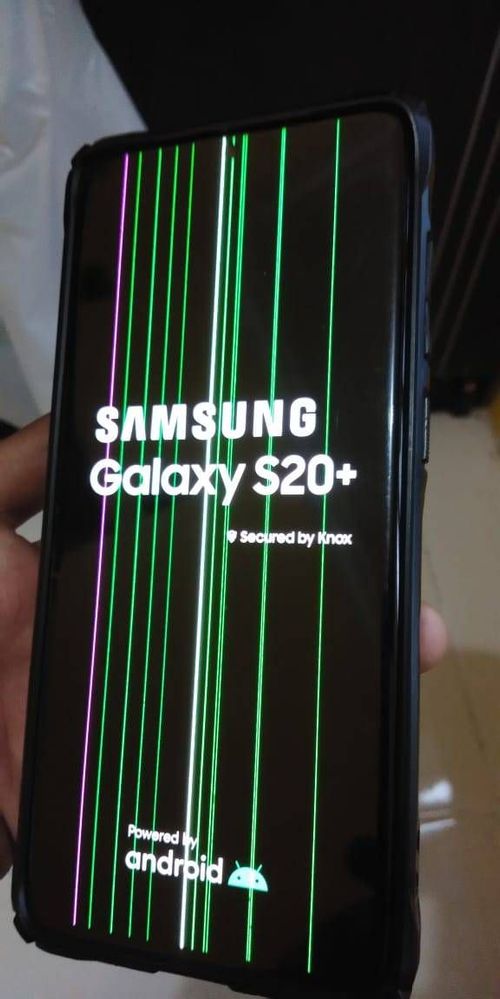
A pink line on your Samsung can look scary — but the right fix depends on whether it’s software-related or a screen hardware fault.
If you’ve noticed a pink line on your Samsung screen, you’re not alone. People often search for a quick “Samsung pink line fix”
hoping it’s just a setting. Sometimes it is — but many pink-line cases are caused by OLED display panel damage or a connector issue,
which typically needs a proper Samsung screen repair.
Samsung Galaxy S-Series Repair in Brisbane
What Causes a Pink Line on a Samsung Screen?
A pink line can show up for different reasons, but most cases fall into two groups: software or hardware.
Knowing which one you’re dealing with is the key to fixing it fast.
vertical or horizontal colored lines (pink/green/white). This usually requires a screen replacement for a reliable fix.
Step 1: Do the Screenshot Test (Fastest Diagnosis)
Take a screenshot while the pink line is visible, then view the screenshot in your gallery (or send it to another device).
- If the pink line does NOT appear in the screenshot: it’s almost always a hardware screen issue (panel/connector).
- If the pink line DOES appear in the screenshot: it could be software-related (rare), so continue the steps below.
Step 2: Restart (Soft Reset)
A restart can clear temporary glitches. If the line disappears and doesn’t come back, it may have been a one-off software hiccup.
If it returns immediately, keep going.
Step 3: Test in Safe Mode (Rules Out Apps)
Safe Mode temporarily disables downloaded apps. This helps confirm whether an app, overlay, or display filter is causing the issue.
- If the pink line disappears in Safe Mode: uninstall recently installed apps (especially screen dimmers/filters/launchers).
- If the pink line stays in Safe Mode: it strongly suggests a hardware screen fault.
Step 4: Update Your Phone
If the pink line appeared after a recent update (or you’re behind on updates), install the latest software patch.
Sometimes a display bug gets resolved in later releases.
Step 5: Factory Reset (Last Software Step)
If Safe Mode + updates don’t help, a factory reset is the last step to rule out software. Back up first.
When a Pink Line Means You Need Samsung Screen Repair
If the pink line doesn’t show in screenshots, appears as a perfectly straight line, or gets worse over time, a screen replacement is usually the
reliable fix. Many “at home” fixes won’t solve OLED line faults long-term.
Samsung Galaxy S-Series Repair in Brisbane
FAQs: Pink Line on Samsung Screen
Samsung Galaxy Repair in Brisbane

Leave a Reply