Have you ever opened your phone camera only to find something wasn't quite right? From blurry images to unexpected glitches, camera damage can appear in different ways and often worsens if left unchecked. Understanding the early warning signs can help protect your device. At iRepair Experts, our experienced technicians can accurately diagnose the issue and recommend the right repair solution.
Common Signs Of Camera Damage
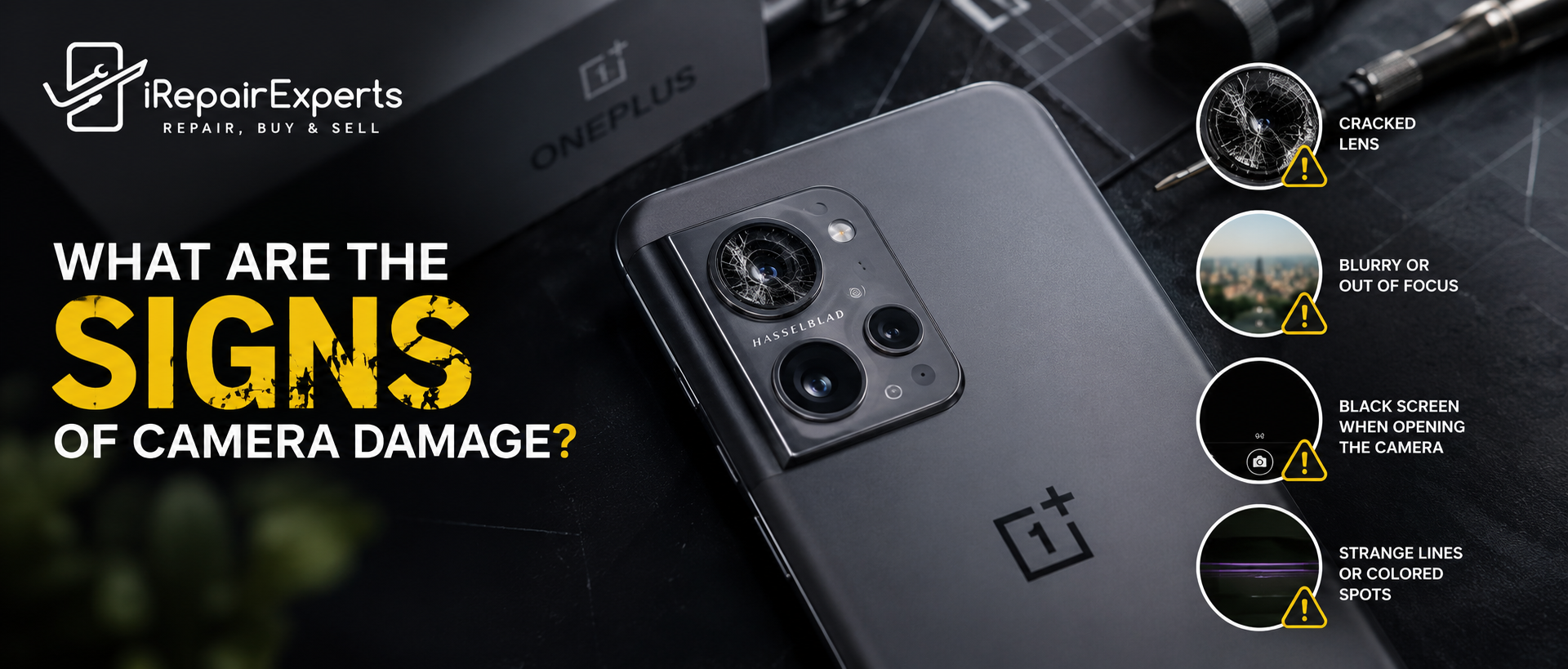
Blurry Or Out Of Focus Photos
If every image looks blurry despite cleaning the lens, your phone may have internal camera damage. I discovered this after dropping my device, and professional inspection confirmed the camera module required attention rather than a simple software fix.
Black Screen When Opening The Camera
A camera app that only shows a black screen often indicates hardware failure. Before booking a repair, I recommend using a OnePlus free diagnostic service to identify whether the issue is software related or genuine camera damage.
Strange Lines Or Coloured Spots
Purple lines, flickering images, or coloured dots usually suggest sensor problems. I noticed these symptoms after an accidental impact, and they became worse over time, making professional assessment the safest solution.
Physical Signs Of Camera Damage
Cracked Camera Lens
A cracked camera lens is an obvious sign of camera damage. Even small cracks can reduce photo quality and allow dust or moisture inside. A professional OnePlus repair can replace the damaged component before further issues develop.
Dust Or Moisture Inside The Lens
Condensation or visible dust beneath the camera glass usually means the protective seal has failed. A OnePlus free diagnostic helps determine whether only the lens requires replacement or if internal components have also been affected.
When Should You Seek Professional Help?
If restarting your phone, updating software, or cleaning the lens does not help, it is time for expert assistance. A trusted OnePlus repair service can accurately diagnose the fault and recommend the most suitable repair without unnecessary replacements.
Tips To Prevent Future Camera Damage
Using a quality protective case and lens protector has helped me avoid repeat issues. Keep your phone away from water, sand, and extreme heat, and choose a reliable phone repair service whenever professional repairs become necessary.
Final Note
Ignoring early signs of camera damage can lead to more expensive repairs later. Whether you notice blurry photos, a cracked lens, or a black camera screen, acting quickly makes a difference. If you suspect a problem, have your phone professionally inspected and repaired before the damage worsens.
Reliable Phone Repairs
We're here when your iPhone needs attention. Call 0731542890 or email contact@irepairexperts.com.au.
Frequently Asked Questions
Can A Damaged Phone Camera Be Repaired Without Replacing The Entire Phone?
Yes. In most cases, only the faulty camera component or lens needs replacing, making repairs far more affordable than purchasing a new device.
How Can I Tell If The Problem Is Software Or Hardware Related?
If restarting your phone, updating the operating system, or clearing the camera app cache does not fix the issue, the problem is more likely to be hardware related.
Can A Phone Still Take Pictures If The Camera Is Damaged?
It depends on the severity of the damage. Minor issues may only affect image quality, while severe damage can prevent the camera from functioning altogether.
Does Dropping A Phone Always Damage The Camera?
Not always. Some drops cause only cosmetic damage, while others can affect the camera sensor, autofocus mechanism, or internal connections.
Why Does My Camera Shake When I Try To Take A Photo?
A constantly shaking image often indicates a fault with the optical image stabilisation system or autofocus mechanism, which requires professional inspection.
Can Water Damage Affect Only The Camera?
Yes. Moisture can enter through damaged seals and impact the camera module without immediately affecting other phone functions.
Is It Safe To Keep Using A Phone With A Cracked Camera Lens?
It is not recommended. A cracked lens can allow dust, dirt, and moisture to enter the camera assembly, potentially causing more extensive damage.
Why Does My Camera App Keep Crashing?
Frequent camera app crashes may be caused by corrupted software, insufficient storage, or failing camera hardware. A proper diagnosis can identify the exact cause.
Will Replacing The Camera Restore The Original Photo Quality?
If high quality replacement parts are used and the repair is completed correctly, the camera should perform similarly to its original condition.
Can Dirt On The Lens Permanently Damage Image Quality?
Surface dirt usually only affects clarity temporarily and can be cleaned safely. However, debris trapped inside the camera module requires professional repair.
How Long Does A Typical Camera Repair Take?
Many camera repairs can be completed on the same day, although repair times vary depending on the phone model and parts availability.
Can Overheating Damage My Phone Camera?
Yes. Repeated exposure to excessive heat may affect camera sensors, autofocus performance, or internal electronic components over time.
Is It Worth Repairing An Older Phone Camera?
If the phone still performs well and repair costs are reasonable, replacing the camera is often more cost effective than buying a new device.
Can A Screen Protector Protect The Camera?
A standard screen protector does not protect the rear camera. A dedicated camera lens protector offers additional protection against scratches and minor impacts.
What Should I Do Immediately After Noticing Camera Problems?
Avoid forcing the camera to operate repeatedly. Back up your data, inspect the lens for visible damage, and arrange a professional diagnostic to prevent the issue from worsening.
Book a Brisbane repair in under 60 seconds.
Same-day service, genuine-grade parts, 12-month warranty. Walk-ins welcome at Paddington · Coorparoo · Calamvale.
Book a repair