Before you assume your data is gone forever or that you need a whole new phone, you should know that board-level shorts are actually highly repairable. Let's look at what is actually happening on the board and how it gets fixed.
What Exactly is a VDD_MAIN Short?
Think of your iPhone's logic board as a miniature electrical grid. VDD_MAIN is the primary power line on that grid. It takes power from the battery and charging system and distributes it to almost every major component inside the phone, including the CPU, the cameras, and the screen display chips.
A "short to ground" happens when a tiny component along this main line—usually a tiny ceramic capacitor used to regulate voltage—fails internally. Instead of letting electricity flow smoothly down the line, the broken component acts like a bridge, dumping all the power straight into the phone's ground plane. Because the power has nowhere to go, the phone's safety systems immediately shut everything down to prevent overheating or fire risks.
Signs Your iPhone 16 Pro Has a Motherboard Short
Because a dead battery or a broken screen can also cause a black display, here are the classic signs that point directly to a VDD_MAIN motherboard issue:
- Zero Response: The phone won't show the low-battery charging icon, even after sitting on a charger for hours.
- No PC or Mac Connection: Plugging the phone into a computer triggers no prompt, no sound, and it doesn't show up in Finder or iTunes.
- Zero Current Draw: When we plug the phone into a USB amp meter in our shop, it pulls 0.00 amps. The phone is actively blocking power from entering the device.
- Rapid Overheating: If the board is connected directly to a DC power supply, it will immediately draw massive amounts of current and heat up rapidly before you even hit the power button.
How a Technician Finds and Fixes the Short
This isn't a repair you can handle with a standard screwdriver set. It requires completely stripping down the phone, pulling out the motherboard, and working under a high-powered microscope.
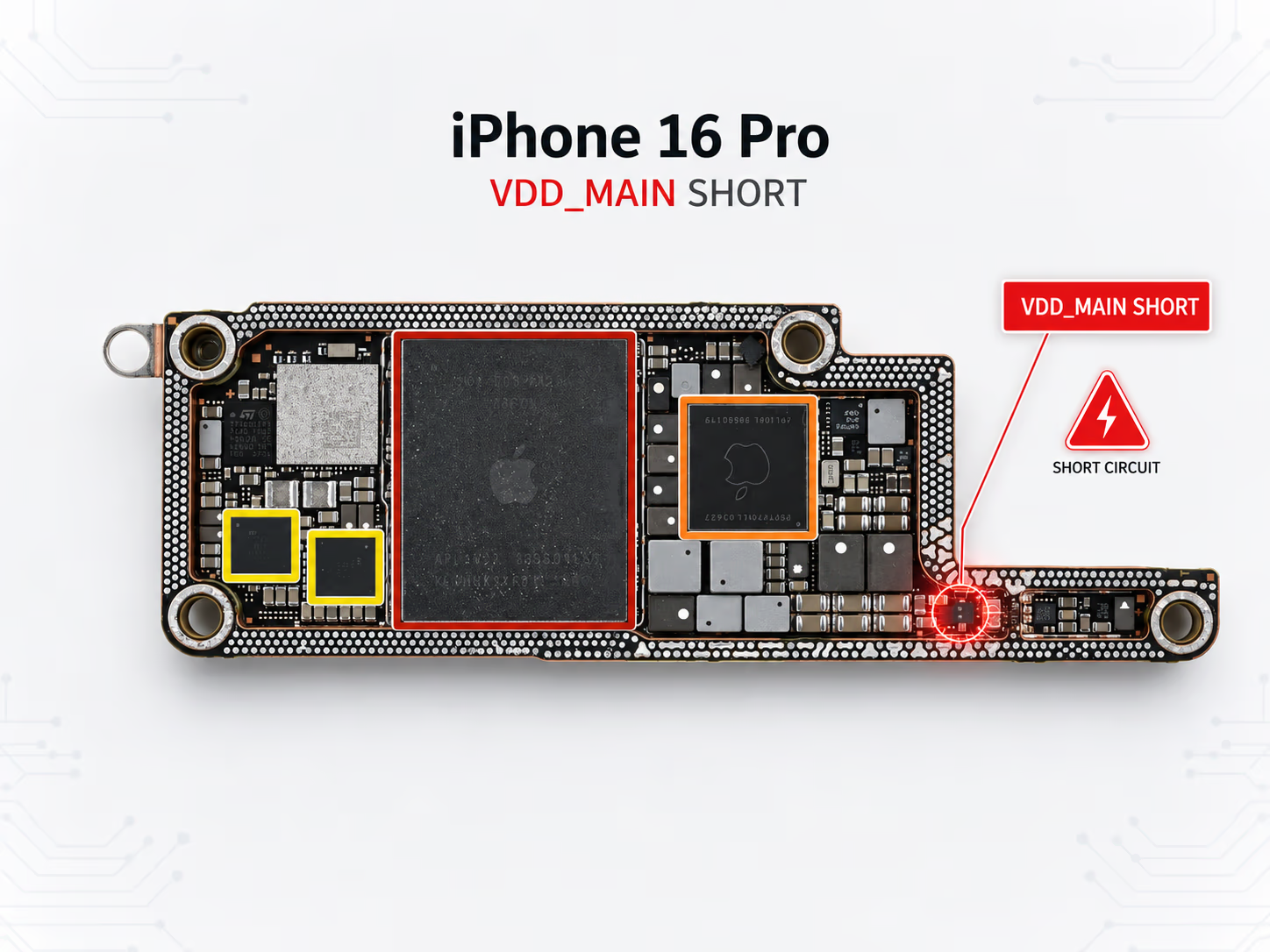
A microscopic view of an iPhone 16 Pro logic board during a VDD_MAIN short circuit diagnosis.
To pinpoint the exact failure, the repair workflow follows these precise steps:
1. Voltage Injection
We bypass the battery protection systems and safely inject a small amount of voltage directly onto the VDD_MAIN line using a specialized diagnostic power supply.
2. Thermal Imaging
Because the shorted component is absorbing all the injected current, it converts that electricity straight into intense heat. Using a thermal camera or rosin smoke, we look for the exact component that lights up hot under the microscope (just like the highlighted area in the schematic image above).
3. Microsoldering Replacement
Once the bad capacitor is found, we use micro-tweezers and precision hot air to safely desolder it from the board. After checking that the short is completely cleared, we solder a brand-new component in its place to restore the original circuit.
Is My Data Still Safe?
The short answer is yes. A VDD_MAIN short stops power from moving around the phone, but it rarely damages the encrypted NAND storage chip where your photos, messages, and files live. As soon as the bad component is replaced and power delivery is safely restored to the circuit, the board will boot up normally with all your data perfectly intact.
If you're dealing with a dead device or want to learn more about our micro-soldering capabilities, you can check out our specialized iPhone Repair services for transparent diagnostic options and expert motherboard support.
Book a Brisbane repair in under 60 seconds.
Same-day service, genuine-grade parts, 12-month warranty. Walk-ins welcome at Paddington · Coorparoo · Calamvale.
Book a repair