iPad Battery Replacement Brisbane Guide
If your iPad is not lasting like it used to, you are not alone. Battery problems are one of the most common issues we see with iPads used for school, work, business, kids, streaming, drawing, and everyday browsing.
A weak battery can make a good iPad feel unreliable. It may still turn on, open apps, and look normal, but the battery can no longer hold charge or deliver stable power like it should.
From real repair experience, many iPads that seem “finished” only need the battery checked. A proper diagnosis helps confirm whether the issue is the battery, charging port, cable, or internal board.
1. Your iPad Battery Drains Too Fast
This is usually the first sign people notice. You charge your iPad to 100%, use it for a short time, and it quickly drops to 70%, 50%, or even lower.
Some battery drain is normal if you are gaming, watching videos, using full brightness, or running heavy apps. But if the battery drops quickly during normal use, the battery may no longer be holding charge properly.
Real Example
If your iPad used to last most of the day but now needs charging every few hours, that is a strong sign the battery health has dropped.
2. Your iPad Turns Off Before It Reaches 0%
Your iPad might show 30%, 20%, or even 40% battery left, then suddenly shut down. When you plug it in, it may turn back on and show battery again.
This usually means the battery is not giving stable power to the device. The battery percentage on the screen may look okay, but the battery itself may not be strong enough when the iPad needs power.
Why This Happens
A worn battery can sometimes show charge remaining, but when the iPad needs more power, the battery drops out and the device shuts down.
3. Your iPad Only Works While Plugged In
If your iPad works fine on the charger but turns off soon after you unplug it, the battery is likely very weak.
At this stage, the iPad stops being portable, which is one of the main reasons people use an iPad in the first place. If the screen, charging port, and main board are still in good condition, battery replacement can often bring the device back to normal everyday use.
4. The Battery Percentage Jumps Up and Down
A healthy iPad battery should drop gradually. If the percentage jumps from 80% to 50%, then suddenly to 20%, or moves up and down without reason, the battery may be giving incorrect readings.
This can sometimes happen because of software issues, but if the iPad is older or has been used heavily for years, battery wear is often the cause.
A proper diagnosis can confirm whether the issue is the battery, charging system, or something else inside the device.
5. Your iPad Takes Too Long to Charge
Slow charging can be caused by a few things. It could be the cable, charger, charging port, battery, or internal charging circuit.
Before replacing the battery, it is smart to check the simple things first. Try another good-quality cable and wall adapter. Check if the charging port has dust or debris inside. Restart the iPad and see if charging improves.
If the iPad still charges slowly or gets stuck on one percentage for a long time, the battery may be worn or the device may need a charging diagnosis.
6. Your iPad Gets Hot During Normal Use
All devices can get warm sometimes, especially when charging, updating, gaming, or using video apps. But if your iPad gets hot during basic use, it should not be ignored.
A weak battery can sometimes work harder than normal. Heat can also come from background apps, charging faults, liquid damage, or board-level issues.
Important Battery Warning
If your iPad is getting hot and the battery is draining quickly at the same time, stop guessing and get it checked. Heat can be linked to battery stress, charging issues, or internal faults.
Do not keep charging an iPad overnight if it is getting unusually hot or showing signs of swelling.
7. The Screen Is Lifting or the iPad Looks Swollen
This is one of the most important warning signs. If the screen is lifting, the frame looks pushed out, or the iPad does not sit flat, the battery may be swollen.
A swollen battery can put pressure on the screen and other internal parts. Do not press the screen back down. Do not keep charging it overnight. Do not try to open it yourself.
A swollen iPad battery should be checked by a repair technician as soon as possible. Leaving it too long can cause extra damage and make the repair more expensive.
Signs of a Swollen iPad Battery
Screen lifting from the frame
The display may start lifting on one side because the battery is pushing from inside.
iPad does not sit flat
If the iPad rocks on a table or the back looks pushed out, the battery may be swelling.
Screen pressure marks
A swollen battery can press against the display and create marks, lifting, or touch issues.
8. Your iPad Battery Does Not Last Like It Used To
Sometimes there is no sudden fault. The battery just becomes weaker over time. If your iPad is a few years old and used every day, the battery will naturally wear down.
Common Signs of Battery Wear
Shorter battery life
The iPad needs charging more often than it used to.
Poor standby time
The battery drops even when the iPad is not being used much.
You carry a charger everywhere
The iPad no longer feels reliable away from the charger.
Random shutdowns
The iPad turns off even when it still shows battery remaining.
Is It Worth Replacing an iPad Battery?
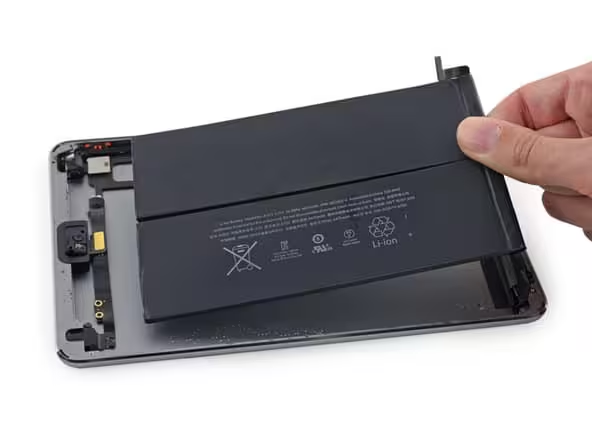
In many cases, yes. If your iPad is still in good condition, the screen is working, the charging port is fine, and the device still suits your needs, battery replacement can be much cheaper than buying a new iPad.
Battery replacement may be worth it if:
- The iPad is still fast enough for your daily use
- The screen is not badly damaged
- The device has enough storage for you
- You do not want to spend money on a new iPad
- The battery is the main problem
If the iPad has a damaged screen, charging issue, liquid damage, or motherboard fault, it is better to get a full diagnosis first. That way, you know the real repair cost before making a decision.
How Much Does iPad Battery Replacement Cost?
iPad Battery Replacement Price Guide
The cost of iPad battery replacement depends on the model and condition of the device. Some iPads are more difficult to open than others, and parts pricing can vary between models.
Guide Pricing
Model Dependent
Final pricing depends on your iPad model, battery type, parts availability, screen condition, and whether any other issue is found.
For an accurate quote, the iPad needs to be checked first. A battery issue can sometimes look like a charging port fault or board issue, so diagnosis helps avoid replacing the wrong part.
What We Check Before Replacing an iPad Battery
At iRepair Experts Brisbane, we do not replace the battery blindly. A battery problem can sometimes be caused by a charger, charging port, software issue, or internal board fault.
Our Diagnosis Process
1. We check the battery symptoms
We look at battery drain, charging behaviour, shutdowns, heat, and any swelling signs.
2. We inspect the charging port
Dust, damage, or a loose charging port can sometimes look like a bad battery.
3. We check the screen and frame
If the battery is swollen, the screen and frame may also need careful inspection.
4. We confirm the repair option
Once the real issue is confirmed, we provide an upfront quote before starting the repair.
iPad Battery Replacement Brisbane
If your iPad battery is draining fast, shutting down early, charging slowly, or only working while plugged in, iRepair Experts can help.
We provide iPad repair in Brisbane with free diagnosis, quality parts, and a 12-month warranty on repairs. Same-day options may be available depending on the iPad model, parts availability, and current workload.
FAQs About iPad Battery Replacement
How do I know if my iPad battery needs replacing?
Common signs include fast battery drain, random shutdowns, slow charging, battery percentage jumping, overheating, and the iPad only working while plugged in.
Can an iPad battery be replaced?
Yes, most iPad batteries can be replaced. The repair process depends on the iPad model and condition of the device.
How much does it cost to replace an iPad battery?
The price depends on your iPad model and whether there are any other issues. A diagnosis is the best way to confirm the exact cost before repair.
Is it better to replace the iPad battery or buy a new iPad?
If the iPad is still working well apart from the battery, replacing the battery can be a cost-effective option. If the device has several major faults, replacement may be better.
Why is my iPad battery draining so fast?
Fast battery drain can be caused by battery wear, heavy app use, high brightness, software issues, background activity, or charging faults. If it keeps happening, the battery should be checked.
Is a swollen iPad battery dangerous?
A swollen battery should be treated seriously. If your iPad screen is lifting or the frame looks pushed out, stop using and charging the device and get it checked by a technician.
How long does iPad battery replacement take?
Repair time depends on the model, parts availability, and workload. Some iPad battery repairs may be completed the same day, while others may take longer.
Will replacing the battery make my iPad faster?
If the battery is weak and causing shutdowns or power issues, replacing it can improve reliability. It may not fix every speed issue, but it can make the iPad more stable if the battery was the main problem.
Final Advice
If your iPad still works well but the battery no longer lasts, replacing the battery can be a smart repair. The most important step is to confirm the real fault first.
For iPad battery issues, charging problems, cracked screens, and other iPad repairs, visit our main page here: iPad repair in Brisbane.
Book a Brisbane repair in under 60 seconds.
Same-day service, genuine-grade parts, 12-month warranty. Walk-ins welcome at Paddington · Coorparoo · Calamvale.
Book a repair